Write the Steps Down Before You Automate Anything
You can't automate a job you can't describe. Every tool, cheap or expensive, needs to be told the steps. If the steps only live in your head, the tool is guessing, and so is anybody you hire.
So this chapter is the free part. An index card and the tools already sitting on your phone. No new software until the steps are written down and you've watched them repeat.
Fair warning about who's giving you this advice.
"I'm really bad at SOPs and everything like that, but I am really good at turning a business into an absolutely automatable system. There's something about me that loves to turn everything into a conveyor belt and a factory line, and I am great at doing that because that's how businesses work."
The index card test
An SOP is a standard operating procedure, a document that says how a job gets done. If you've ever tried writing them, you may have ended up with a binder nobody opens. Skip the binder.
Take one job you do every week and write its steps on a single index card. Then ask one question. Could somebody you hired yesterday do that job from the card, without calling you?
If the answer is no, the card is missing something. Whatever they'd have to call you about is the exact spot a tool would get wrong, because a tool can't call you either.
Try it on something small. Say a customer calls to move their date. Your card might say: find the booking, check the new date, update it, tell the customer. Hand that to someone new and they hit a wall on the second line. Check it where? Against what? What happens if the new date is already taken? Every one of those questions is a line you skipped because you do it without thinking.
Keep each line short and start it with a verb. Check the calendar. Send the quote. Take the deposit. A booking inquiry might come out as five or six lines on one card. Yours will use different words, and you should use yours, because you're the one who has to read it at the end of a long day.
The card forces you to cut the explaining and keep the steps. If a step needs a paragraph, it probably hides a decision, and you flag a decision instead of automating it. Put a star next to that line.
A conveyor belt on one sheet of paper
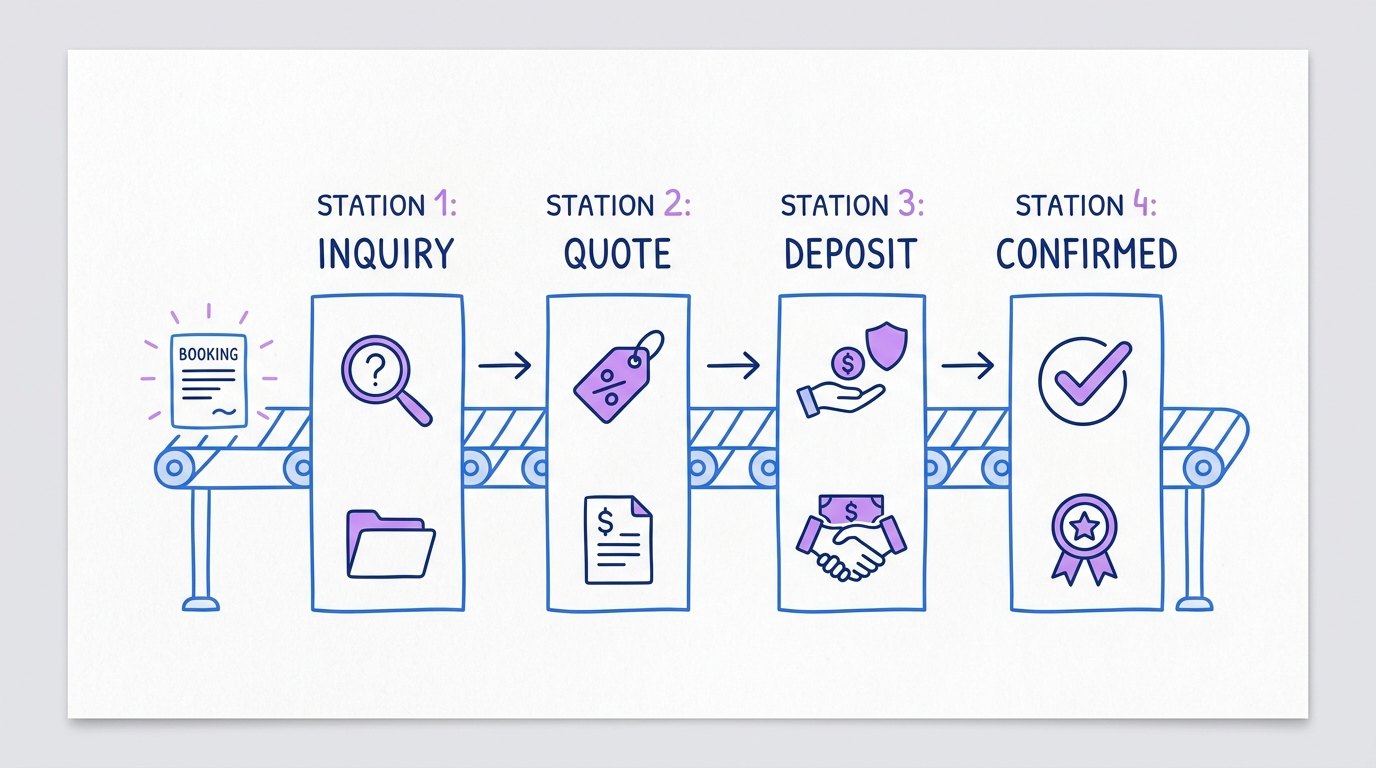
A lead goes down the line like a part in a shop. It comes in one end, moves through the same steps, and comes out the other end as a booked job or a no. Number come in, number go out. Nothing in the middle is mysterious once it's written down.
Most of what a business does repeats. The steps stay the same from customer to customer. What changes is the wording and the details, like the date, the address and what they want.
So once you have cards for a few jobs, lay them out on one sheet of paper in order, from the first call to the job being paid. Start with the calls themselves. Write down every reason people call you, and next to each one, the card that picks it up.
Now look where one card ends and the next one starts. Where the last step on one card doesn't hand off cleanly to the first step on the next, you found a leak. Maybe the quote goes out and nobody owns the follow-up. Maybe the deposit comes in and nothing tells you to confirm. Circle every leak. Those are the spots where money slips out quietly, and they're also the spots where automation fails first, because nobody told it what happens next.
Keep the tools you already open every day
The project software rebuild from Chapter 9 taught me the most boring lesson of all. Don't make a fancier screen. Copy how people already work. If they were used to working out of a shared spreadsheet, keep them in the spreadsheet and move the steps in around them.
Everybody wants to make something better. When you're changing how your own business runs, fight that urge. People will use a plain tool they already know long before they use a nice one they have to learn.
Same with customer databases. A CRM is a database of your customers and every conversation you've had with them, and it's only as good as what somebody types into it.
Your phone already does a lot of this. Most phones let you save a shortcut that expands into a full message you type all the time. Your calendar can remind you before a job. A spreadsheet can hold every booking on one row, with a column for each step on your card. None of it costs anything, and none of it needs a login you'll forget.
Owners who do use AI tend to start on the plain stuff too. In the NFIB 2025 Small Business and Technology survey, 29% of owners said they use or plan to use AI for communications like emails and documents, according to NFIB. Another 27% said marketing or advertising, and 9% said customer service, according to the same survey.
That lines up with what I'd tell you anyway. Use AI to help write the card or clean up a message you send every week. Leave the decisions with you.
One step that repeats every week
Look at your cards and circle the one step you did the most times last week, done the same way each time. That step is your first candidate. Pick it by count, even if something else on the cards annoys you more.
A step is ready to move to a tool when two things are true. It's written down, and it happens every week without you having to think about it. If either one is missing, it stays on the card.
Then run it by hand from the card for a couple of weeks. If you catch yourself skipping a step or adding one, fix the card before any software sees it. The card has to match what you do on a normal day.
Paper runs out eventually. When the same step happens so often that copying it off the card eats real hours, or when it needs to happen at 11 at night while you're asleep, a tool has earned its place. And when you get there, the card is the setup. You already know the steps, the order and where the leaks were. If the tool is Kai, the card becomes what you tell him to ask and do, and the KaiCalls setup docs show where each piece goes.
And move one step at a time. Hand one step to a tool, watch it for a couple of weeks, then pick the next one. If you move five at once and something goes wrong on a Saturday, you won't know which one broke, and you'll be finding out with a customer on the line.
Anything with a star next to it, the steps that need your judgment, stays yours for now. The next chapter is about those.
Common questions
Questions this chapter gets asked
How do I start automating my small business for free?
Start on paper. Write one weekly job as steps on an index card, check whether someone new could follow it, then run it by hand for a couple of weeks. Saved text shortcuts and calendar reminders on your phone cover plenty of the early work. Skipping the writing makes everything after it harder: "Because if you try and build without knowing your end system or SOPs, it's going to be a lot harder."
Do I need a CRM for a small service business?
Not until you're using something consistently. A CRM is a customer database, and it only helps if every conversation goes into it. If a shared spreadsheet is where your bookings already live, stay there and get disciplined about it. After helping a company rebuild its software, the way I put it was blunt: "If your problem is you don't use your CRM today, a new CRM will not make it better."
How do I write down a process for my business?
Pick one job you did this week and write each step as a short line that starts with a verb, like check the calendar or send the quote. Keep it to one index card. Then hand the card to someone who has never done the job and watch where they get stuck. Every question they ask is a missing step. Add it, and try again until they can finish without asking you anything.
Is a spreadsheet good enough to run a small business?
For a lot of small businesses, yes, and often for longer than you'd expect. A spreadsheet everyone opens beats software nobody logs into. Move to a paid tool when the same step repeats so often that doing it by hand costs you real hours, or when it has to happen while you're asleep. When you do move, keep the columns and steps your people already know.
2.4 MB PDF
Get the PDF
The whole book in one file, with the figures, to read offline or pass to someone else.
Download the PDF